What an Official Visualizer is, and when a single needs one.
An Official Visualizer is a video an artist or label puts out for one song where the picture is designed motion, not filmed footage: the cover art moving, a loop, a 3D scene or a spectrum, running for the whole track. “Official” means it comes from the artist, the same way “Official Music Video” or “Official Lyric Video” does.
It isn't a YouTube feature. There's no visualizer upload type: the words go in the title, as in Artist – Song (Official Visualizer). It costs a fraction of a music video, so it's often the first video a single gets, and sometimes the only one.
Published 3 October 2026 · By Loopwalk · Platform facts read 3 October 2026
Music video, visualizer, lyric video, Art Track, Canvas.
Five things a song can have on screen. Where each lives and what it costs, from the sources linked in each cell, read on 3 October 2026. Costs are starting prices, not quotes.
Music video
- What it is
- Filmed or animated footage made for the song: performance, story, or both.
- Where it lives
- YouTube; Spotify's full-length video beta takes official music videos (Spotify)
- Typical cost
- $1,500–$10,000 for an indie video, sometimes up to $50,000 (The Source, March 2026)
- Effort
- A shoot, a crew and an edit: days to weeks
Official Visualizer
- What it is
- A video of the whole song where the picture is designed motion: the cover, a loop, a scene, a spectrum. No filmed footage.
- Where it lives
- YouTube. Spotify doesn't take visualizers as video (Spotify)
- Effort
- A look and a render: hours, no shoot
Lyric video
- What it is
- The words on screen, timed to the vocal, over a background or as the whole picture.
- Where it lives
- YouTube. Spotify doesn't take lyric videos as video (Spotify)
- Effort
- Every line timed to the vocal
YouTube Art Track
- What it is
- “An automatically generated YouTube version of a track”: the sound recording and the album art.
- Where it lives
- YouTube and YouTube Music, in album playlists and search results (YouTube Help)
- Typical cost
- $0: YouTube makes it from your distributor's delivery
- Effort
- None
Spotify Canvas
- What it is
- A 3–8 second vertical loop that plays in Spotify's Now Playing view in place of the cover.
- Where it lives
- Spotify's mobile app, added in Spotify for Artists (Spotify)
- Effort
- A short 9:16 loop, no audio
| Format | What it is | Where it lives | Typical cost | Effort |
|---|---|---|---|---|
| Music video | Filmed or animated footage made for the song: performance, story, or both. | YouTube; Spotify's full-length video beta takes official music videos (Spotify) | $1,500–$10,000 for an indie video, sometimes up to $50,000 (The Source, March 2026) | A shoot, a crew and an edit: days to weeks |
| Official Visualizer | A video of the whole song where the picture is designed motion: the cover, a loop, a scene, a spectrum. No filmed footage. | YouTube. Spotify doesn't take visualizers as video (Spotify) | Fiverr gigs from $5 to $60; tools from about €10 a month (Videobolt, billed yearly) | A look and a render: hours, no shoot |
| Lyric video | The words on screen, timed to the vocal, over a background or as the whole picture. | YouTube. Spotify doesn't take lyric videos as video (Spotify) | Fiverr gigs from $10 to $300 | Every line timed to the vocal |
| YouTube Art Track | “An automatically generated YouTube version of a track”: the sound recording and the album art. | YouTube and YouTube Music, in album playlists and search results (YouTube Help) | $0: YouTube makes it from your distributor's delivery | None |
| Spotify Canvas | A 3–8 second vertical loop that plays in Spotify's Now Playing view in place of the cover. | Spotify's mobile app, added in Spotify for Artists (Spotify) | $0 to add; Fiverr gigs from $10 to $100 | A short 9:16 loop, no audio |
How a visualizer differs from each.
The short answers to the questions people search, one format at a time.
Visualizer vs music video
A music video is shot or animated for the song, usually with the artist in it, and its budget goes on people, places and an edit. A visualizer skips all of that: the picture is made from the song and its artwork. That makes it a fit for release day when the music video comes later, and for the singles that won't get one at all.
Visualizer vs lyric video
A lyric video is about the words: each line on screen as it's sung, so it has to be timed to the vocal. A visualizer is about the sound and the artwork, and needs no lyrics at all. They overlap when the words are animated as the picture; the upload is then usually titled a lyric video. Our lyric video maker times pasted lyrics to the vocals for you.
Art Track vs visualizer
YouTube makes an Art Track for every track your distributor delivers: the audio over the still album art, in album playlists and search. You don't make it and can't change the picture. A visualizer is a video you upload to your own channel, with motion, your title and links in the description, so it's the version you can premiere, share and cut into Shorts.
What a music visualizer is
Software that turns sound into moving pictures. Some run live inside a player or on a stage, reacting to whatever plays; others render a video file of one song for upload. An Official Visualizer is the second kind. How a visualizer listens, to the loudness of the mix, to frequency bands or to separated instruments, decides how closely the picture follows the song; the audio-reactive visualizer page explains the three.
Where each one goes in 2026.
YouTube is the home of visualizers and lyric videos. On Spotify, the moving picture is the Canvas.
“Visualizers, lyric videos, multi-song concerts, and videos without music are not currently supported.”
Spotify's full-length video upload, in beta, takes live performances, sessions, covers and official music videos. Clips, the short videos on Spotify, closed to new uploads on 17 June 2026 (Spotify for Artists). So a visualizer goes to YouTube, and Spotify gets a Canvas: a 3–8 s, 9:16 loop, 720–1080 px tall, as an MP4 or a JPG (Canvas guidelines). You can add one to any track, upcoming releases included (Adding a Canvas).
On YouTube, the Art Track appears without you doing anything. An Official Artist Channel “brings together all your subscribers and content from your different YouTube channels into one place”, your topic channel included (YouTube Help), so the visualizer and the Art Tracks end up on one channel. Shorts, Reels and TikTok take 9:16 clips; a 30-second cut of the visualizer from the chorus is the usual way in.
When a single needs one.
An Art Track exists anyway, so the question is whether you want a video you control. These are the usual reasons, and the cases where it's not worth it.
Make one when
- The single has no music video, or the music video comes weeks later.
- You want something to premiere, link from your bio and pin on your channel on release day.
- You need 9:16 clips for Shorts, Reels and TikTok, and a Canvas, from the same look.
- The song is the focus track of an EP or album, and the rest will live as Art Tracks.
- You want the cover art and the release to look like one campaign everywhere.
Skip it when
- The music video goes up the same day, and you'd rather send everyone to one upload.
- It's a deep album cut that nobody will look for outside the album.
- You'd upload a still image with the audio: the Art Track already is that.
What a visualizer usually shows.
Four common kinds, each shown with one of our own renders of our demo song. Most visualizers on YouTube are one of these, or a mix.
- Real exports
- ·16:9
- ·Hover or scroll to play

Cover in motion
The cover art stays the centre of the frame and the motion builds round it: a ring of spectrum, a pulse, a slow push-in. The most common kind, because every release already has a cover.
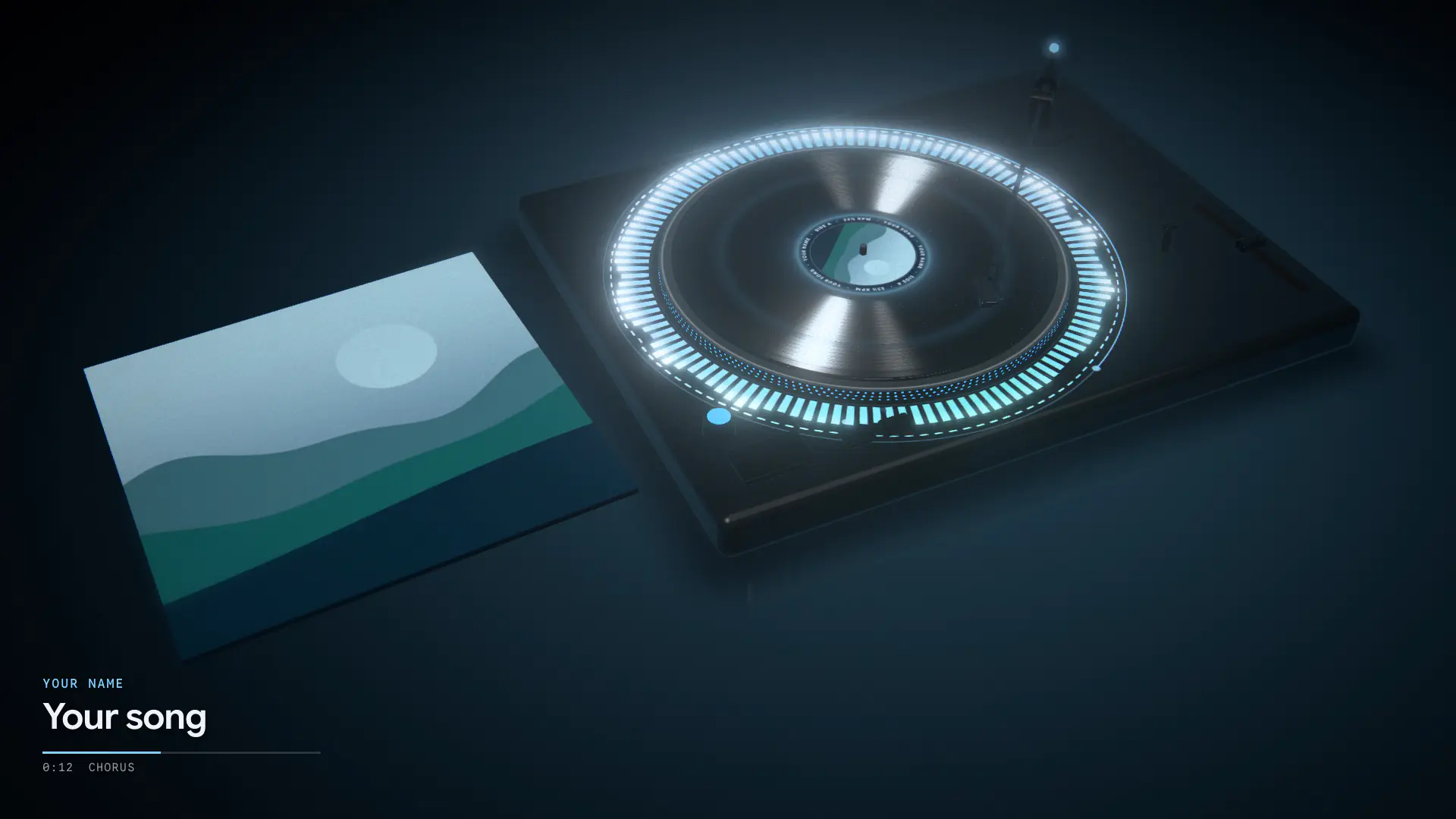
A turning record
The cover as the label of a spinning record on a deck, the tonearm on the song. It reads as “new music” at a glance.
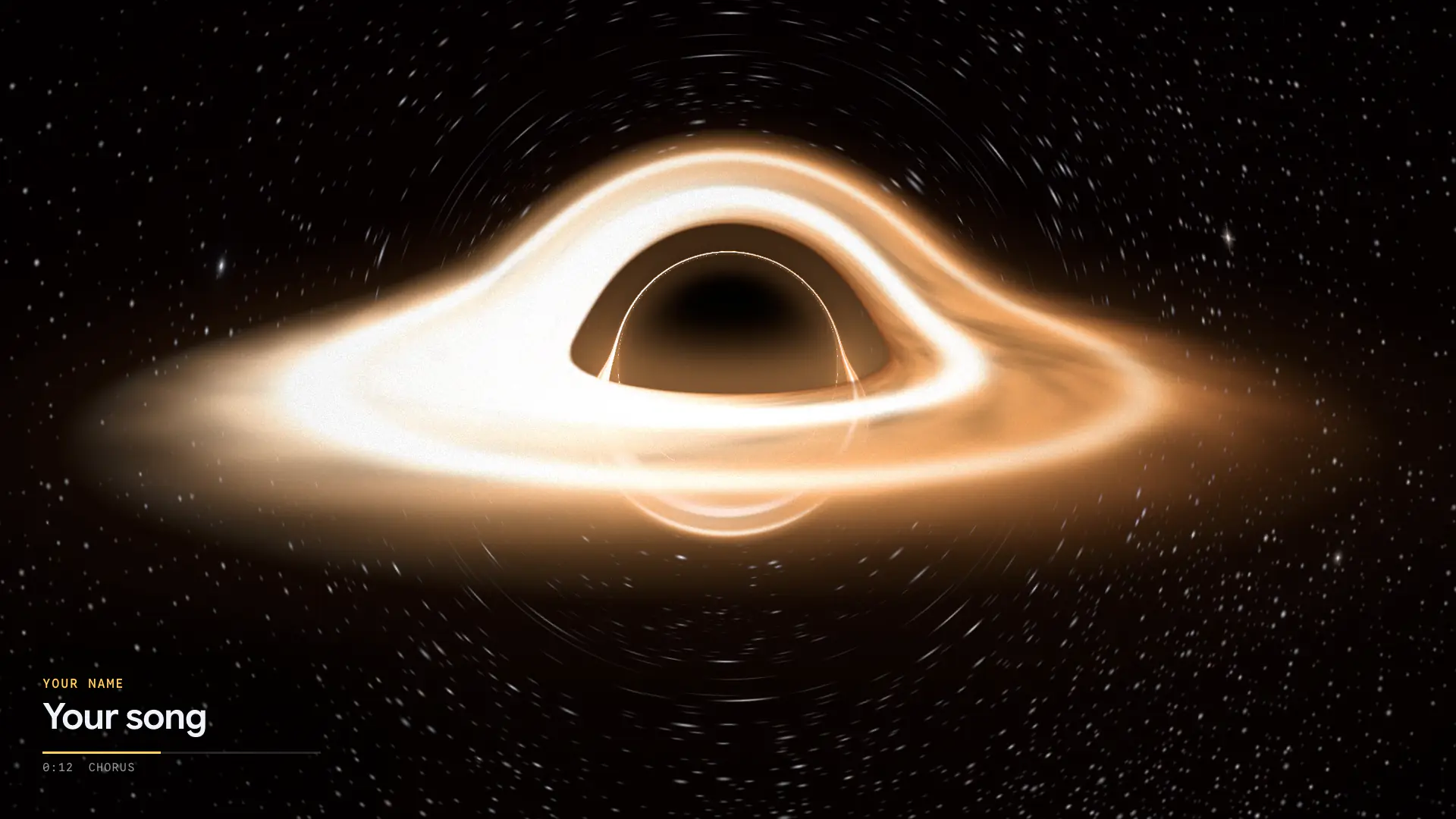
A 3D scene
A world to fly through: space, a road, a stage, a room. The song carries the camera, and a section change can change the shot.
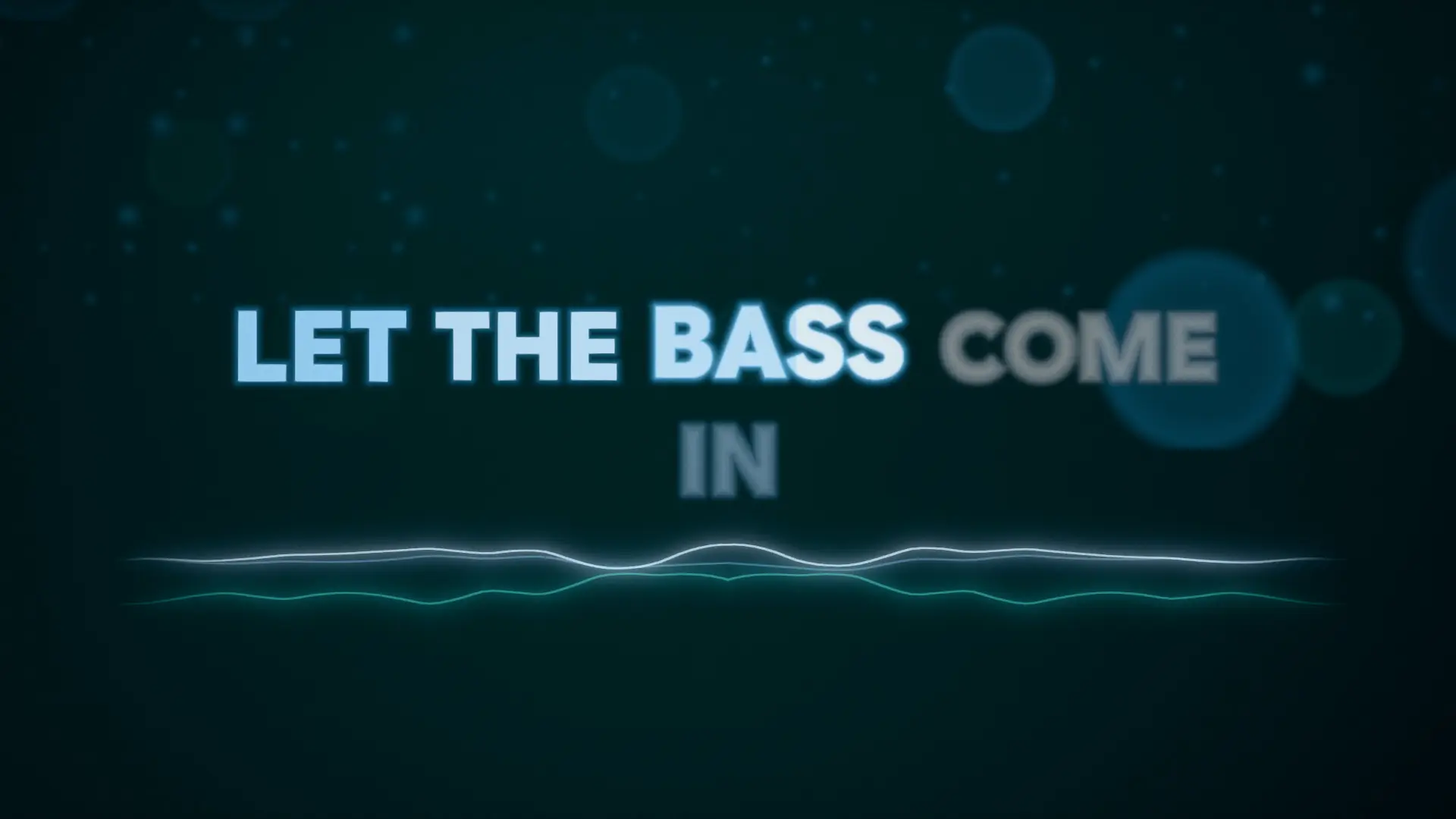
Kinetic words
The lyrics as the picture, word by word. This is where a visualizer and a lyric video meet; most uploads call it a lyric video.


Two more are common: a waveform or spectrum line over a photo of the artist (our Scope Lines template does this), and an abstract loop of colour and light. The length is the whole song, the shape 16:9, and the title card usually carries the song and the artist.
Three ways to make one.
From most of your time to least. Each gets you a video for YouTube; they differ in cost, in effort and in how closely the picture follows the music.
01
In a video editor
Put the cover on a timeline, add motion and an audio-spectrum effect, add the title, export at the song's length. It costs your time and, if the editor is paid, its subscription. The spectrum effect reacts to the mix, so the kick and the bass pull the same way.
02
Hire someone
A freelancer or a motion designer makes it from your brief and your art. Fiverr gigs start from about $5 for a 2D spectrum; a custom piece costs more and takes days, with rounds of changes. The right call when you want a look nobody else has.
03
A visualizer tool
Upload the song, pick a look, render. Template tools fill a designer's template with your cover and text; AI tools generate footage from prompts. Loopwalk separates the stems first, so the drums, the bass and the vocals each move their own part, and the chorus changes the scene. $29 a month for the video files and stills; the preview is free.
Before you upload it.
A checklist for the upload itself. The full settings, each from YouTube's help pages, are on the YouTube visualizer page.
- Title it Artist – Song (Official Visualizer); YouTube allows 100 characters (YouTube Help).
- Put the credits and your listening link at the top of the description.
- Upload a 16:9 thumbnail with the song title on it, not an auto-picked frame.
- Keep the frame rate you exported at; don't re-encode it in an editor.
- Cut a 30-second 9:16 clip from the chorus for Shorts and Reels, and a Canvas for Spotify.
- Upload only music you own or control.
Make the visualizer for your next single.
Upload the track and try it in any template, at full quality, with the stems. The preview is free; the video files and the thumbnail come with Unlimited.
Sources · read 3 October 2026
- Spotify: upload full-length videos
- Spotify: Clips
- Spotify: Canvas guidelines
- YouTube: What is an Art Track?
- YouTube: Official Artist Channel
- The Source: music video costs, 2026
YouTube is a trademark of Google LLC. Spotify is a trademark of Spotify AB. TikTok is a trademark of ByteDance Ltd. Instagram is a trademark of Meta Platforms, Inc. Loopwalk is not affiliated with them.