Spinning vinyl video maker: your cover on a 3D record that turns to the beat.
Upload your track and its cover. Vinyl prints the cover on the label and the sleeve, turns the record at your tempo and drops the tonearm on the song. We split the track into stems: the kick thumps the platter, the bass lights the grooves, the voice lights the label and the spectrum rings the rim. It renders 16:9 for YouTube and 9:16 for Reels, Shorts and TikTok: a vinyl visualizer made from the song itself, not a picture turning at a fixed speed.
11 styles · 16:9 · 9:16 · 1:1 · Up to 4K at 60 fps on Unlimited · Free preview on your song

What drives what in Vinyl.
Every moving part listens to its own part of the song. These are the template's twelve reactions, from its source, with the name each one has in the studio, where you can turn it up, down or off.
- 6 stems
- ·Kick · snare · hi-hat events
- ·Sections and the drop
- Tempo (the beat grid)The record's spin: one turn every few beats, as near 33⅓ rpm as the tempo allows, so the label comes round on the downbeat. At 124 BPM that is one turn a bar.Speed: Beat-true, 33⅓, 45 or Half-time
- Song progressThe tonearm: the stylus moves in across the record as the song plays. It cues down in the first 1.6 s, lifts and swings home in the last 2.4 s, and the platter runs up and down with it. A thin progress arc can trace the song so far.Always on · Progress ring
- The song's loudnessThe grooves themselves, pressed once per track: the outer edge is the start, the run-out is the end, loud passages press lighter, and each section change leaves a gap like a track break.Grooves · Groove shine
- KickThe platter and the record bounce, the tonearm bounces, the camera takes a small nudge.Kick thump
- Bass (level and notes)The grooves light in the palette, and every bass note sends a ring of light out across them. The pool of light under the record breathes with it.Bass lights the grooves · Light pool
- VocalsThe label's edge glows and its print lifts; the deck's target lamp lights.Voice lights the label
- Spectrum (24 bands)The ring round the rim or round the label, drawn as 24 to 180 bars, dots, a wave or LED blocks, with peak caps that hold and fall.Spectrum: Place, Style, Bars, Peak caps
- Hi-hatsDust specks on the record catch the light.Hi-hat glints
- SnareThe deck's strobe lamp flashes, lighting the strobe dots on the platter, and the ring flashes with it.Strobe lamp · Snare flash
- Melody pitchThe key light swings round the record, and the highlight across the grooves turns with it.Melody moves the light
- SectionsThe ring, the glow, the light and the framing change per section and blend over 1.6 s: the chorus brighter and fuller, the intro, breakdown and outro dimmer.Section looks
- The dropThe turntable brakes to a stop in the beats before it, then whips the record round whole extra turns, so it still lands on the downbeat. The grooves, the ring and the bloom flare.Turntable stop · Drop spin · Drop
The Music tab adds five extra moves for Vinyl: Bass lights the grooves, Kick pumps the ring, Voice lights the label, Melody turns the light and Chorus moves in, where the camera closes on the record in the chorus. Under Advanced you can link any setting to any sound. Nothing is integrated frame to frame, so a moment renders the same played, seeked or exported.
Your cover becomes the label.
The cover comes from the file's embedded art, or from a picture you add in Branding (JPEG, PNG or WebP, up to 12 MB). Vinyl uses it in four places.
- The labelYour cover · optional printed ring
- The sleeve's frontYour cover · laminate sheen
- Picture Disc pressingYour cover across the record
- Blurred cover backdropYour cover, redrawn in the palette
- The coloursTaken from your cover by default
The label print can be plain, or carry a printed ring of title, artist, side and speed round the cover, in your title's font. Every colour in the scene, from the ring and the groove light to the room and the deck's lacquer, is a role in one palette, and by default that palette comes from your cover. You can pick one of 8 palettes or three colours of your own instead. A picture or video of your own can replace the room behind the record.
Without a cover, or with the cover set to Off in Branding, Vinyl prints a palette design on the label and the sleeve, with the title and artist ring when it's on. A picture disc presses black, and the room uses a stand-in. The renders on this page are made that way, so the label you see is the palette print, not artwork.
The label is small in a wide frame. A bold cover with one clear shape reads best; for a detailed one, try the Picture Disc style, which spreads the cover across the whole record, or the Focus setting, which closes in on the record and its ring.
Built for the tall frame too.
In 9:16 the scene is composed again, not cropped: the record slides out of the bottom of the sleeve and the sleeve sits above the deck. The Flat record view gives a clean card that suits a Reel.

Vinyl · Neon Platter · Real export, 9:16

Four views cover most releases: the release card, with the record half out of its sleeve over a reflective floor; the deck from above; the deck at three-quarters through a macro lens; and the flat record. Decks come in black satin, walnut, brushed silver, white or a palette lacquer, on dark gloss, wood, concrete or felt.
All 11 Vinyl styles.
Each style is a starting point: change the view, the pressing, the deck or the ring after you pick it. The stills come from the studio and show our own test cover on the label and the sleeve.

Midnight Deck
The black-satin deck at three-quarters on dark gloss, 120 bars round the rim, the table going soft behind the record.
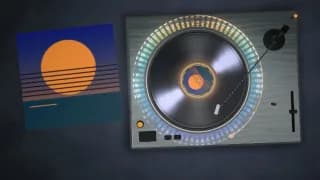
Top Deck
Straight down on a brushed-silver deck on concrete, an LED-block ring, the strobe dots turning on the platter.
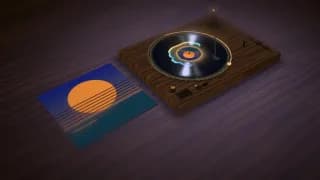
Walnut Room
A walnut deck on a wood table at three-quarters, a wave ring round the label and a warm pool of light.
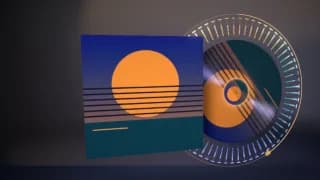
Picture Disc
The record sliding out of its sleeve as a picture disc, the cover across the whole record, the blurred cover behind it.

Colour Pressing
The release card with a record pressed in a palette colour, a wave ring and extra shine on the grooves.
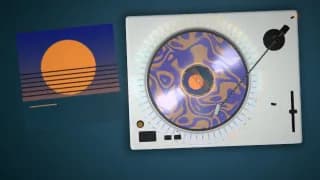
Marble Edition
From above: a record marbled in two palette colours on a white deck and felt, with a dotted ring.

Reel Spin
The flat record square to the camera on a flat colour, a long lens and a full progress arc: the clean card for Reels.

Crate Digger
The release card in front of a record-store wall of sleeves, a worn ring on the jacket, a wave ring.
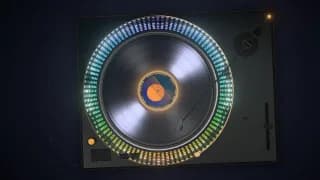
Neon Platter
From above in a dark room: an LED-block ring in spectral colours, high glow, and the snare hitting the strobe lamp harder.

Daylight Card
The release card in a light room on a flat colour, with low glow and little vignette: the bright, print-like one.

Label Glow
The flat record with a dotted ring round the label; the voice and the bass light it harder than in any other style.
Why a spinning record works for a release.
It's the classic vinyl-visualizer format on YouTube for lo-fi, house, jazz and soul uploads, and it holds up for good reasons.
- It shows the release itself. An album cover vinyl video puts the artwork where a listener would see it on the real thing: on the label and the sleeve of the record they would hold. No footage, no face and no story are needed; the artwork does the job it was made for.
- It lasts a whole song. A record player music video asks little of the viewer. A record turns slowly and evenly, so a three- or four-minute upload doesn't tire the eye the way fast cuts do. The changes come from the music: the grooves lighting on the bass, the ring filling in the chorus, the brake and whip on the drop.
- It fits genres that live on vinyl. House and techno DJs, jazz and soul reissues and lo-fi's crackle all point at the record. A turning deck says what kind of music it is before the first note.
- Where it's weaker. A record can't do much with a huge drop or a lyric-led song. For a festival drop, look at Stage or Tunnel on the templates page; for words, the lyric video maker, or lyrics laid over the record. For a full YouTube upload, see the YouTube visualizer guide.
A rotating image, or a record that hears the song.
The common way to make a spinning vinyl video is a picture of a record turning at a set speed: keyframed in a video editor, or made in a browser tool such as SpinningVinyl. Its facts below are from its own site, read 3 October 2026.
How it turns
Loopwalk Vinyl
At the song's tempo, the label on the downbeat; the drop brakes and whips it
- A rotating image in an editorAt the speed you keyframe
- SpinningVinylAt a speed you pick: 6, 8, 10, 14 or 18 RPM, or a still image
What reacts to the music
Loopwalk Vinyl
The platter, grooves, label, tonearm, ring, lamps and light, each from its own stem or section
- A rotating image in an editorNothing, unless you animate it
- SpinningVinylAn optional bar visualizer, "reactive bars that dance to your track"
The scene
Loopwalk Vinyl
A 3D deck and sleeve, 4 views, 11 styles, a room lit in your colours
- A rotating image in an editorWhatever you build
- SpinningVinylA record (marbled on Pro), a spinning CD or a CD jewel case; ring, no-ring and turntable styles
Shapes
Loopwalk Vinyl
16:9, 9:16 and 1:1, plus a looping Canvas
- A rotating image in an editorAny
- SpinningVinyl1:1, 9:16, 16:9, 4:5 and 4:3, as MP4 or MOV
Free
Loopwalk Vinyl
The full-quality preview on your song, and stills; no video file
- A rotating image in an editorYour editor's terms
- SpinningVinylDownloads with a small watermark, up to 1 minute of audio
Paid
Loopwalk Vinyl
Unlimited: the whole song, up to 4K at 60 fps, no watermark
- A rotating image in an editorYour editor's terms
- SpinningVinylPro removes the watermark; audio up to 12 min (5 min at 1080p)
Where it runs
Loopwalk Vinyl
Stems split on our servers once; the video renders in your browser
- A rotating image in an editorOn your computer
- SpinningVinylIn your browser; files stay on your device
| Compared on | A rotating image in an editor | SpinningVinyl | Loopwalk Vinyl |
|---|---|---|---|
| How it turns | At the speed you keyframe | At a speed you pick: 6, 8, 10, 14 or 18 RPM, or a still image | At the song's tempo, the label on the downbeat; the drop brakes and whips it |
| What reacts to the music | Nothing, unless you animate it | An optional bar visualizer, "reactive bars that dance to your track" | The platter, grooves, label, tonearm, ring, lamps and light, each from its own stem or section |
| The scene | Whatever you build | A record (marbled on Pro), a spinning CD or a CD jewel case; ring, no-ring and turntable styles | A 3D deck and sleeve, 4 views, 11 styles, a room lit in your colours |
| Shapes | Any | 1:1, 9:16, 16:9, 4:5 and 4:3, as MP4 or MOV | 16:9, 9:16 and 1:1, plus a looping Canvas |
| Free | Your editor's terms | Downloads with a small watermark, up to 1 minute of audio | The full-quality preview on your song, and stills; no video file |
| Paid | Your editor's terms | Pro removes the watermark; audio up to 12 min (5 min at 1080p) | Unlimited: the whole song, up to 4K at 60 fps, no watermark |
| Where it runs | On your computer | In your browser; files stay on your device | Stems split on our servers once; the video renders in your browser |
When they're the better pick. SpinningVinyl suits a quick, simple spinning record when you want a free download, a 4:5 or 4:3 shape, a GIF, a CD instead of a record, or when the files must never leave your computer. An editor you already own is fine for one static loop under a mix. Pick Vinyl when the video should follow the song: the tempo, the drums, the bass, the voice and the drop.
SpinningVinyl: spinningvinyl.es, FAQ · read 3 October 2026
Output shapes and what's free.
The preview is free at full quality on your own song, with the stems. Video files come with Unlimited, $29 a month, with the first 7 days at $1.95 as a launch offer.
- YouTube · 16:9Whole song · 720p to 4K · 30 or 60 fps
- Reels · Shorts · TikTok · 9:1630 s · 720 × 1280 or 1080 × 1920
- Spotify Canvas · 9:16Up to 8 s in whole bars · loops
- Square · 1:11080 × 1080
- Release packYouTube + Canvas + Reels in one zip
- StillsUnlimited · thumbnail 1280 × 720 · no watermark
Free $0
Every template, style and setting on your own track, at full quality with its stems, for viewing and personal use. Three new songs a day. No video file.
Unlimited $29 / month
Unlimited exports in every shape above, up to 4K at 60 fps, no watermark, commercial use. Monthly, no credits, cancel any time.
The video renders frame by frame in your browser tab, not as a screen recording, and joins the song's audio. A recent Chrome or Edge on a laptop or desktop is the safest choice for long or 4K renders.
Put your song on a record.
Upload the track and its cover, pick Vinyl, and hear the platter thump with your kick. The preview is free; the video file comes with Unlimited.
Sources · read 3 October 2026
YouTube is a trademark of Google LLC. TikTok is a trademark of ByteDance Ltd. Instagram is a trademark of Meta Platforms, Inc. Spotify is a trademark of Spotify AB. Loopwalk is not affiliated with them.